DePress requires working Eclipse with KNIME for both users and developers.
KNIME SDK
- Download KNIME SDK in version 2.8.0 (it is just our suggestion, DePress should also work with other versions but if not, use 2.8.0 as we mentioned).
- Extract files. You do not have to install anything. You can start using KNIME just by clicking executable file eclipse.exe.
- It is sometimes needed for DePress to increase KNIME's memory. To do so, go to the folder where KNIME has been extracted, find a file eclipse.ini. Click on it with the right mouse button and edit the file with eg. Notepad. At the end of the file add -XX:MaxPermSize=256m (you can choose any other value; 256m is usually enough).
- You can switch to KNIME perspective by clicking on the table icon on the top right corner of Eclipse window. Choose KNIME(if you can not see it, click Other... - it should be there somewhere).
- In case of any problem, you can look for help at the KNIME's website.
Running plugins
- Setup your KNIME as described in Quickstart
- After configuring SDK, run eclipse.exe
- Click Help -> Install New Software.
- Next to the box Work with click Add.
- Name your plugins source as you want and as the Location insert http://impressivecode.github.io/ic-depress/update/v2 (or /v1 for older release). Click OK.
- DePress plugin appeared below. Click Select all to choose plugins to install and click Next twice.
- Read the license and when you agree with it, tick it and finish.
- Restart Eclipse application.
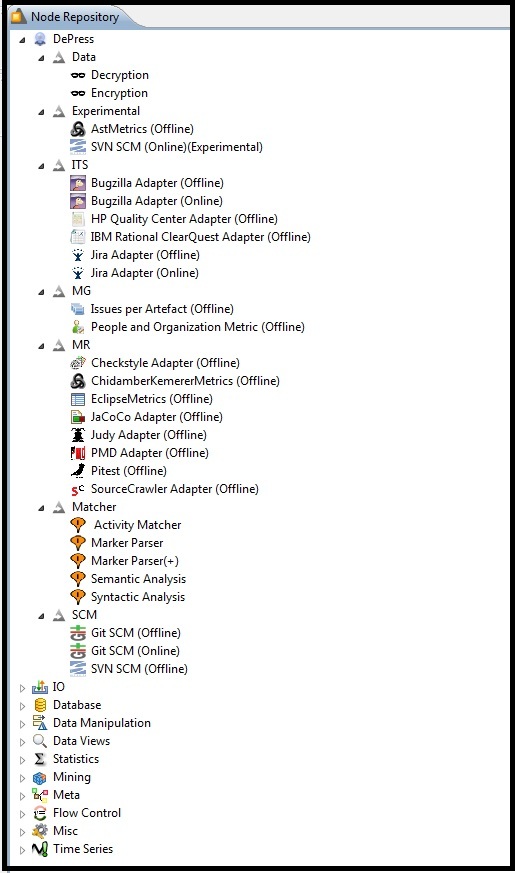
- When you switch the perspective into KNIME, you will see DePress's plugins in the Node Repository. Click to check ->
If you need any help with using the analysis tools or just with generating needed results, check this site.
If you would like to add any new feature, please use JIRA as written here.
To inform us about a bug or to report a CR, also use JIRA. It is really important for us to keep all information about changes in DePress in one place.
Please do not use GitHub Issues for enhancement request and bugs.
Have a nice time using DePress. Good luck!